Paid Promotion for Advertisers
The Paid Promotion marketplace is where you buy sponsored posts in verified Telegram channels. Channel owners list their channels with a public rate card; you browse the catalog, compose your ad, pick a posting time, and pay from your Onflow Ads wallet. Your money sits in escrow — it is only released to the channel owner after our monitoring bot has verified that your post ran as promised. If the owner declines or ignores the request you are refunded automatically, and if the post is pulled early our monitor pauses the payout (on insured plans that refund is automatic too).
This section covers the advertiser (buyer) side of the marketplace. If you own Telegram channels and want to sell placements, see the channel-owner section of this guide instead.
Who it is for
- Brands and product owners who want their post in front of a real, vetted Telegram audience.
- Agencies and media buyers placing campaigns across several channels from one budget.
- Channel owners who also advertise — the owner role and the advertiser role sit on the same account, so you can buy placements and sell them.
Where everything lives
The marketplace lives inside your dashboard at https://onflowads.com/telegram/dashboard/paid-promotion. A navigation bar at the top of every Paid Promotions page carries the main pills — Home, Marketplace, Campaigns, Cart, Watchlist, Media plan and Auctions; the Analytics and Activity pages are reached from within the flow (or by their direct URLs below):
| Page | URL | What it is |
|---|---|---|
| Home | https://onflowads.com/telegram/dashboard/paid-promotion | Your advertiser home: stats, spotlight deals, quick links |
| Marketplace | https://onflowads.com/telegram/dashboard/paid-promotion/catalog | The channel catalog — browse, search, filter, compare |
| Campaigns | https://onflowads.com/telegram/dashboard/paid-promotion/orders | Every booking and campaign, with live status and proof |
| Cart | https://onflowads.com/telegram/dashboard/paid-promotion/cart | Review placements and pay into escrow |
| Watchlist | https://onflowads.com/telegram/dashboard/paid-promotion/watchlist | Saved channels with daily price tracking |
| Media plan | https://onflowads.com/telegram/dashboard/paid-promotion/plan | Budget-to-basket builder (Plus feature) and curated bundles |
| Auctions | https://onflowads.com/telegram/dashboard/paid-promotion/auctions | Escrow-backed bidding on prime slots |
| Analytics | https://onflowads.com/telegram/dashboard/paid-promotion/analytics | Per-campaign rollups, exports and rebooking (reached from your campaign cards or this URL) |
| Activity | https://onflowads.com/telegram/dashboard/paid-promotion/activity | A feed of everything that happened on your account |
Choosing the advertiser role
The first time you open Paid Promotions you are asked which side you want to start on:
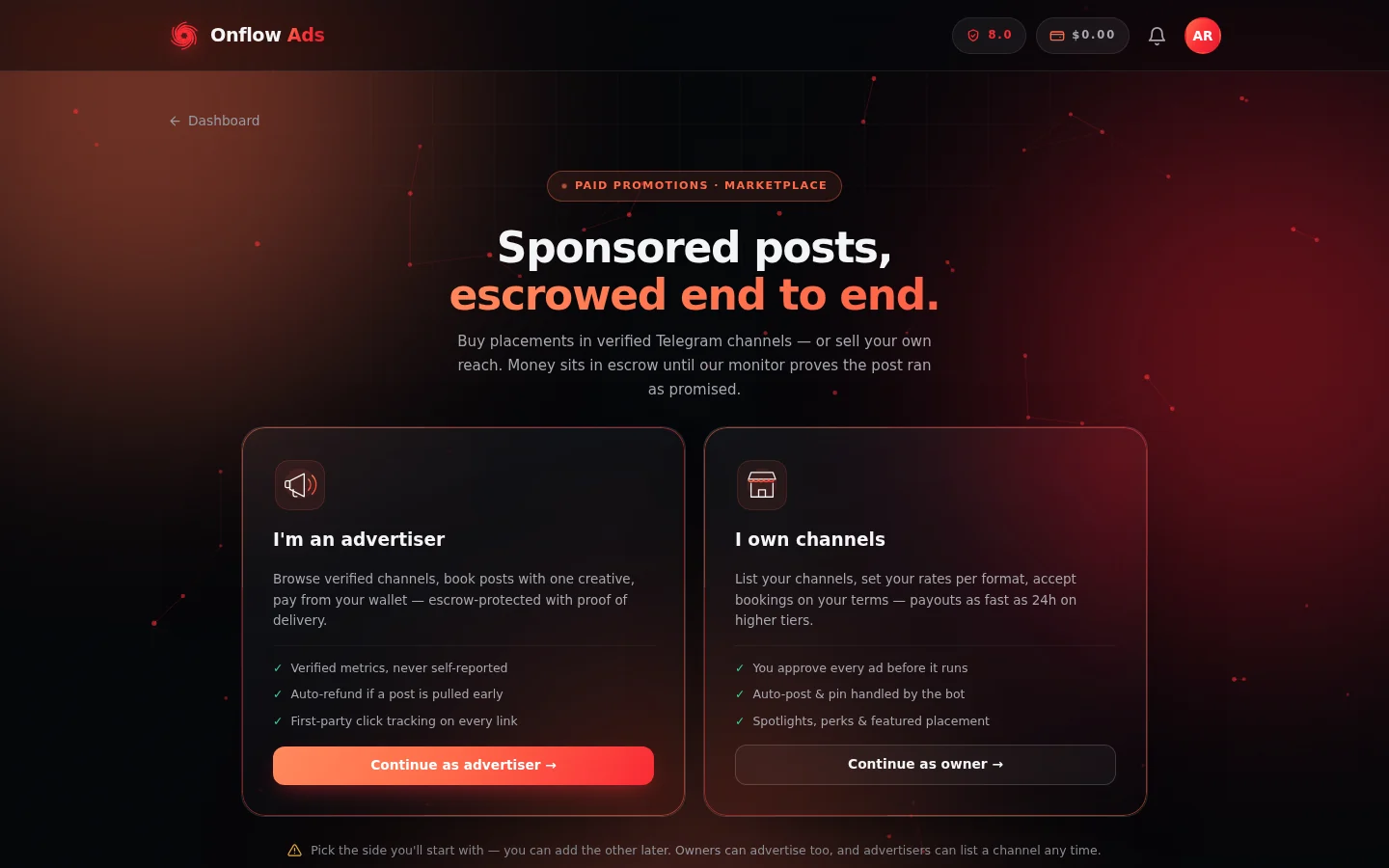
The first screen in Paid Promotions. Pick "I'm an advertiser" to buy placements — the note underneath confirms you can add the other side later.
- Go to https://onflowads.com/telegram/dashboard/paid-promotion.
- Click the "I'm an advertiser" card.
- The button changes to "Tap again to confirm — this can't be undone". Click the same card a second time to confirm. (Depending on your account's verification age, you may be asked to confirm a 6-digit code sent to your email first.)
Picking a side is not a dead end. You pick the side you start with — you can add the other later. An advertiser can become a channel owner at any time with the "Become a channel owner" button on the advertiser home page, and keeps full advertiser access afterwards. Channel owners can also advertise: their navigation bar carries the advertiser pages (Marketplace, Campaigns, Cart, Watchlist, Auctions) under an "Advertise" divider.
The three-step flow
New advertiser accounts see a dismissible first-run guide on the home page. The whole flow really is three steps:
- Browse the marketplace — compare verified channels by real reach, engagement and CPM.
- Compose and schedule — write your post and pick a slot; you see it rendered in Telegram's own style before you book.
- Pay into escrow — your money is only released to the channel once our monitor proves delivery.
Your wallet and your reliability score
Two account-wide numbers matter throughout the marketplace, and both are shown on your advertiser home page:
- Wallet. All Paid Promotion purchases are paid from your main Onflow Ads wallet — one balance across every product. If your balance can't cover a checkout, you'll be told the exact shortfall and pointed to the wallet top-up page.
- Reliability (a score out of 10). Paid Promotions requires a minimum reliability score to book or bid — the current floor is shown right on the cart and bid screens if you fall below it. Clean, on-time activity raises it; false dispute claims lower it.
The escrow promise, in one paragraph
When you pay, your money moves into escrow, not to the owner. The owner then has a fixed window to accept your booking (a countdown is shown on the order — currently 24 hours); if they decline or the window lapses, you are refunded in full automatically. Once the post is published, our monitoring bot repeatedly checks that it is still live and still pinned for the promised hours, and samples its view counts. The owner is paid only after delivery has been verified (exact release timing depends on the owner's standing) — and a monitor-detected failure pauses the payout and can refund you without you having to do anything. The full mechanics are on the Escrow and buyer protection page.
Everything in this marketplace is measured by the platform, not claimed by owners. Channel statistics carry "measured" or "self-reported" labels, delivery numbers come from our own monitor, and clicks are tracked first-party. When a number can't be measured, it is shown as blank — never as zero.
In this section
The pages below run in reading order: browse and shortlist, book and pay into escrow, then track delivery, read the results and use the advanced buying tools.
Browsing the Marketplace
Find the channels worth your budget — search, quick-view sorting, category and tag filters, what every card badge means, and the side-by-side compare tool.
Reading a Channel Page
Decide whether a channel deserves your budget — read its standing grade, measured versus self-reported stats, price history, performance passport, rate card and reviews.
Watchlist and Price Alerts
Save channels with the heart, track their prices with daily snapshots, and get notified on real price drops and new auctions — how the watchlist works end to end.
Booking a Promo Slot
Step-by-step walkthrough of the booking composer — scheduling, writing your creative, adding media, pre-flight checks, and adding the placement to your cart.
Cart and Checkout
How the Paid Promotion cart works — pricing, discounts, promo codes, the bundle offer, the rush premium, and paying into escrow.
Orders and Campaigns
Follow every booking from payment to payout — what each order status means, the delivery timeline, your verification window, cancelling, and answering counter-offers.
Tracked Links and Delivery Proof
How first-party click tracking works, what's inside the frozen delivery-proof archive, and how Placement Proof Certificates let anyone verify your placement without an account.
Analytics and Reporting
Read what a campaign actually delivered — measured reach, blended CPM and CTR, per-channel breakdowns, exports, and one-click rebooking of the channels that beat your average.
Auctions and Bidding
How prime-slot auctions work — escrow-backed bids, instant refunds when outbid, anti-sniping, reserves, auto-bidding, and what happens when you win.
Media Plan Builder
Turn a budget and a brief into a ready-made basket of channels — how the builder picks, why every pick comes with a checkable reason, and how to book or save a plan.
Curated Bundles
Book hand-picked channel packages at a platform-funded discount — how bundle pricing works, the inline booking composer, and what happens after you book.
Escrow and Buyer Protection
How escrow protects your money end to end — automatic refunds, delivery monitoring, insurance, view guarantees, the protection fund, and answers to common questions.
Raising a Dispute
The buyer-side dispute flow step by step — when you can raise a fraud concern, what freezes while it's reviewed, resolution targets, outcomes, and the cost of false claims.
FAQ and Troubleshooting
Answers to common advertiser questions about booking, escrow, auctions, delivery proof, certificates, and refunds in the Paid Promotion marketplace.
Next: Browsing the marketplace — find and shortlist the channels worth your budget.