Telegram Bot & Mini App
Onflow Ads has two halves that work as one product:
- The website — onflowads.com — is where you manage everything: your account, channels, campaigns, wallet, orders and support.
- The Telegram bot is the website's arm inside Telegram. It runs your live campaigns, tracks their performance, sends you notifications as direct messages, and opens the website inside Telegram as a Mini App so you can manage your account without leaving the chat.
A Mini App is a web page that opens inside Telegram itself, in a panel over the chat. Telegram passes your verified identity to the page, so Onflow Ads Mini App pages sign you in automatically — no password needed.
Your Telegram dashboard is the page you will spend the most time on, and it is the same page whether you open it in a browser or inside Telegram — it simply narrows to fit the panel:
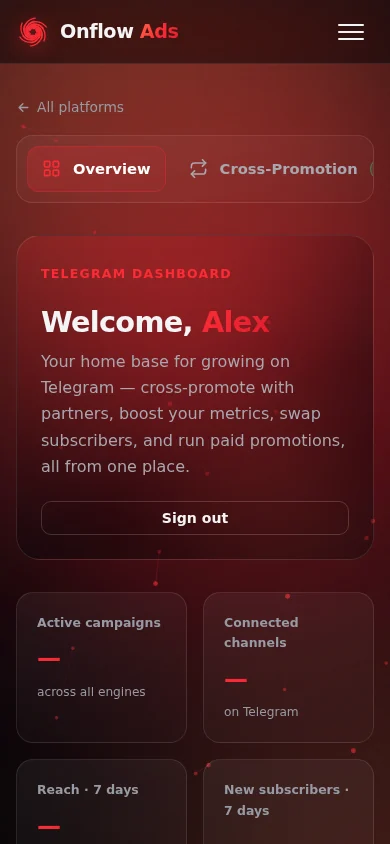
The Telegram dashboard at phone width — the shape it takes when the Mini App opens it inside a chat. The tab strip along the top moves you between engines.
What the bot does for you
| Job | What that looks like |
|---|---|
| Runs your campaigns | Once you add the bot as an admin to your channel from the website, it posts and removes cross-promotion ads on schedule and tracks their performance. |
| Counts ad opens | Buttons on promoted posts route through the bot, so every open is measured and shown in your live stats. |
| Sends you updates | Order updates, payment alerts, campaign-live alerts and rewards arrive as Telegram DMs the moment they happen. |
| Signs you in | Continue with Telegram on the website signs you in with a quick code handshake instead of a password. |
| Opens the website in Telegram | The bot's Open Site menu button opens Onflow Ads as a Mini App, already signed in. |
The bot has no menus, wizards or chat commands of its own — that is deliberate, and it is explained in full in Bot vs Website: Who Does What.
Start it once, and from then on it works in the background — running campaigns, delivering messages, and opening the website for you when you tap a button.
Who it is for
- Channel owners — the bot posts campaigns into your channels and DMs you booking requests and results.
- Advertisers — the bot alerts you as your orders progress and lets you track live campaigns in real time.
- Anyone who prefers Telegram — you can sign in, browse, book and manage almost everything from inside Telegram via the Mini App.
Where to start
If you are new, read these three in order and you will be fully set up:
- Starting the Bot
- Signing In with Telegram or Connecting Your Telegram — whichever matches how you created your account
- Using the Mini App
In this section
The pages below run in reading order: start the bot and connect your account, then use the Mini App, then the notifications and tracking the bot gives you.
Starting the Bot
Open the Onflow Ads bot in Telegram, press Start, and understand exactly what that first tap switches on.
Signing In with Telegram
Sign in to onflowads.com without a password using a 6-digit code handshake between your browser and the Onflow Ads Telegram bot.
Connecting Your Telegram
Link your Telegram account to your existing Onflow Ads website account so the bot can DM you and Telegram-based features can find you.
Using the Mini App
Open Onflow Ads inside Telegram, sign in automatically, and use the site as a native-feeling Mini App.
Mini App Pages
A map of every page the Mini App can open — channels, cross-promotion, paid promotions, boosts, wallet and tools — with what each one is for and how you reach it.
Notifications from the Bot
Every kind of update the Onflow Ads bot sends as a Telegram DM, when it sends them, and how to choose what you receive.
Live Campaign Tracker
The real-time Mini App dashboard the bot attaches to every cross-promotion campaign it runs.
Ad Posts & Click Tracking
How the ads the bot publishes into channels work, and how every tap on a promoted button is counted.
Bot vs Website — Who Does What
The division of responsibility between the Onflow Ads website and the Telegram bot, and why the bot has no menus of its own.
FAQ & Troubleshooting
Short answers and fixes for the questions we get most about the bot, signing in, linking your account, the Mini App, notifications and campaign tracking.
Next: Starting the Bot — open the bot and run your first command.