For advertisers
Profiles, scans and the live watch on your bookings. Scans are included with Lite and above each month; the live watch with Plus and above.
Tell us the topics, words and sites your brand must never appear beside. Onflow Brand Safety Shield, built into Onflow, checks a channel's recent public posts against that list before you book, and, if you switch it on for a booking, watches the posts next to your ad while it runs.
Already a member? Open Brand Safety Shield
Your own blocklist Evidence is a link, never a copy Refund for the time left if an ad is paused
Shield works inside Paid Promotions: you check a channel before you pay, and the ad you booked is watched while it runs.
The topics, words and sites your brand stays away from, and whether a failing channel warns you or blocks the booking.
The channel's recent public posts are checked against your profile: pass, warn, fail or unknown, with a link to each post that matched.
Book with Shield on and the owner sees the categories you avoid before accepting. Your own words and sites stay private.
New posts next to your ad are checked. An unsafe one takes the ad down, refunds the time left and tells both sides why.
Profiles, scans and the live watch on your bookings. Scans are included with Lite and above each month; the live watch with Plus and above.
Your channels' brand-safe status, what was flagged and why, and the right to decline a Shield-on booking or appeal a pause. Free on every plan.
Every account has one role, chosen once after you connect the bot: an advertiser protects campaigns, a channel owner sees the brand-safe status of their channels.
Keep one profile per brand or campaign. Content that is never allowed on Onflow Ads is always included, whatever you choose.
Tick the content categories to avoid, from the same list our content checks use everywhere else on the site.
Add your own words and phrases, such as a competitor's name or a topic your brand handles with care.
List web addresses a post must not link to. They are matched as text: we never visit them.
A channel that fails your profile shows you what it found and asks you to confirm before you book.
A channel that fails your profile cannot be booked under it. Nothing is charged.
A scan reads up to the last 30 public posts from the past 14 days and checks them against your profile. The verdict is pass, warn, fail or unknown, with the categories it found and a link to each post that triggered one. Posts are never copied.
A verdict is kept for 24 hours. Scanning the same channel with the same profile in that time is free and tells you when the scan was made.
Only channels listed in the marketplace or connected to Onflow Ads can be scanned. A private channel's past posts cannot be read, so it says unknown and explains why.
Switch Shield on for a booking and the posts that appear within 60 minutes of your ad are checked against your profile.
The owner sees the categories your profile avoids before accepting a Shield-on booking, and can decline it. Your own words and sites stay private.
A post's words are checked within minutes and then deleted. Only the verdict is kept.
Your ad is taken down and you are refunded for the share of the run that was left.
You and the owner get the reason with a link to the post. Either side can appeal, and a person reviews it.
The brand-safe tag. A channel that has been watched or scanned for 60 days with no upheld incident and no failed scan carries a brand-safe tag on its channel page and in the marketplace. The owner keeps payment for the time an ad was up, and a pause never touches the owner's reliability score.
A scan beyond your plan's monthly scans is $1, less your plan's discount, paid from Onflow Credit first, then the wallet; the quote shows the split before you confirm. A scan that cannot be made is refunded automatically.
| Plan | Scans included each month | Live watch during a booking | Off scans beyond the plan |
|---|---|---|---|
| Free | 0 | No | 0% |
| Lite | 3 | No | 3% |
| Plus | 10 | Yes | 6% |
| Elite | 40 | Yes | 10% |
| Master | 150 | Yes | 14% |
| Ultimate | 1,000 | Yes | 18% |
The plan discount comes off the scan price only, never off a booking, the marketplace fee or any payout, and it is never added to a coupon: the better of the two applies. A plan never changes a verdict.
What a verdict is not. A scan checks what a channel posted recently. It is not a promise about what the channel will post next, which is what the live watch is for. Compare every plan on the pricing page.
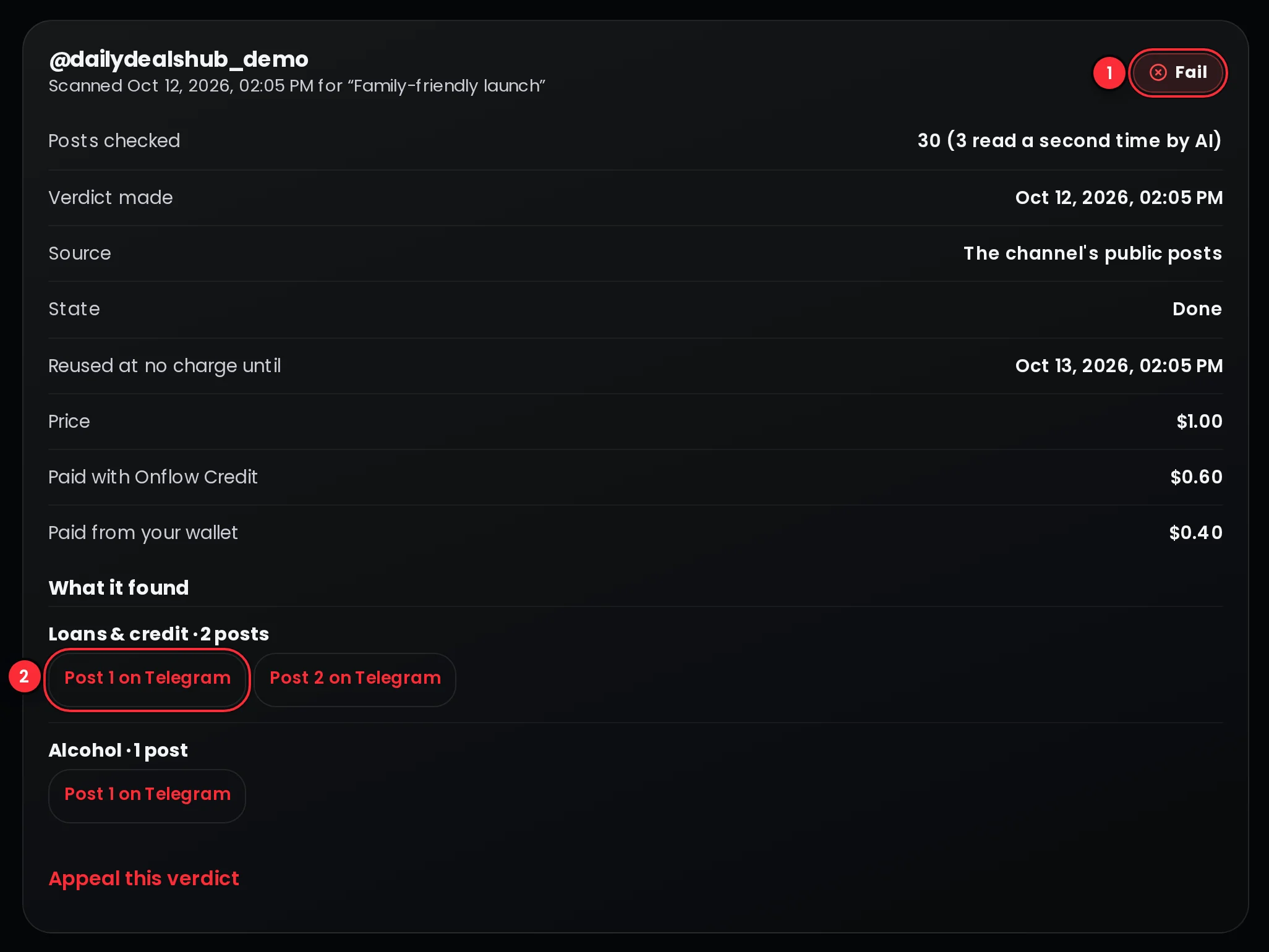 View full picture
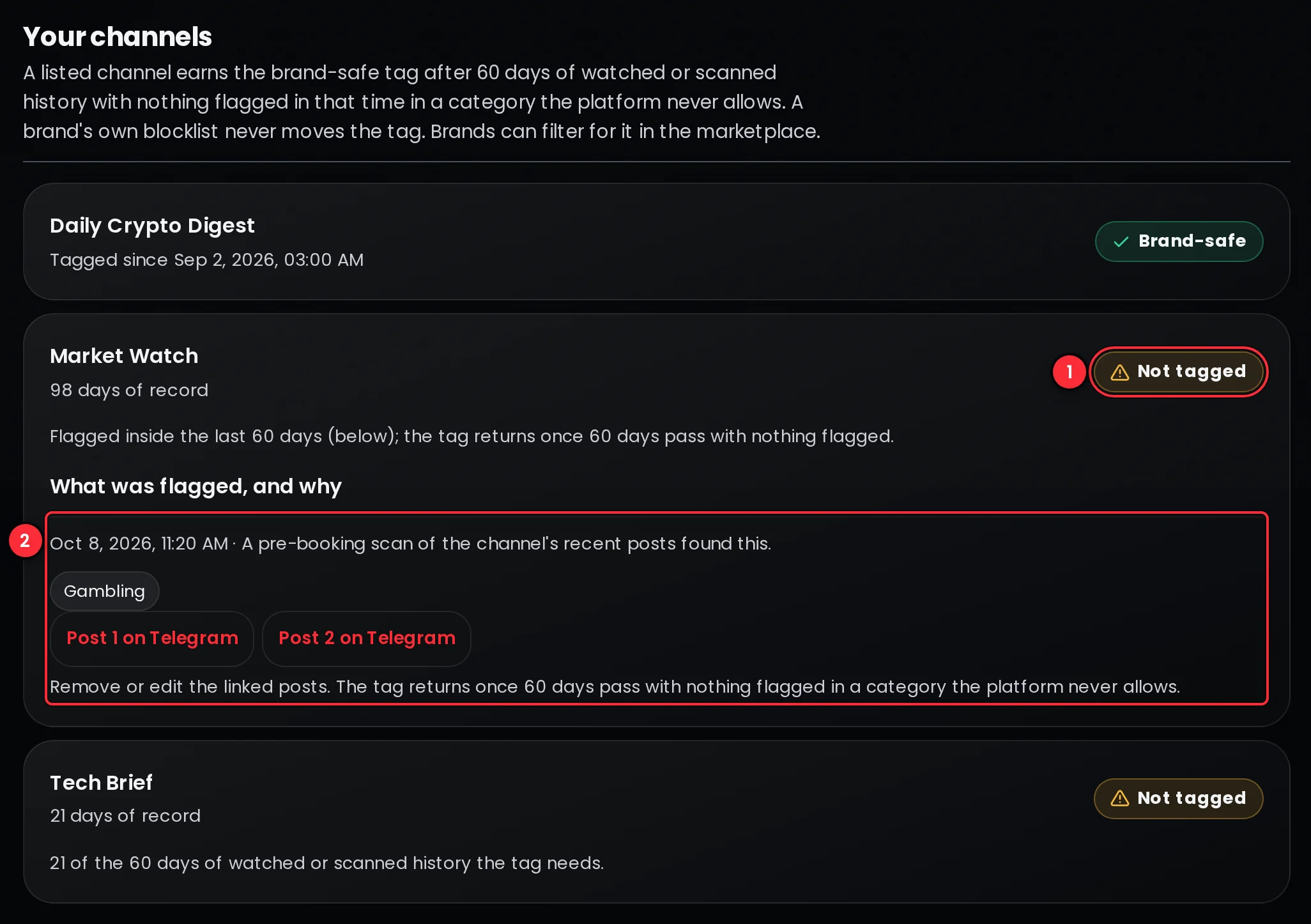 View full picture
Channels listed in the Paid Promotions marketplace or connected to Onflow Ads. A scan reads the channel's recent public posts. A private channel's past posts cannot be read, so its verdict says unknown and explains why.
No. A verdict keeps the categories it found and links to the posts, never their text. During a live booking, the words of a new post are checked within minutes and then deleted.
With warn, a channel that fails your profile shows you what it found and asks you to confirm before you book. With block, the booking is refused and nothing is charged.
On a booking with Shield on, the ad is taken down, you are refunded for the share of the run that was left, and both you and the owner are told why, with a link to the post. Either side can appeal.
The owner keeps payment for the time the ad was up, and their reliability score is not touched: it is not a delivery failure. The channel loses its brand-safe tag for a while.
Scans, profiles and the live watch are for accounts with the Advertiser role. A channel owner sees the brand-safe status of their own channels and what was flagged, and everyone sees the tag on channel pages and in the marketplace.
Lite and every plan above it include scans each month, and Plus and above add the live watch during a booking. Beyond the included scans, each scan costs the listed price, less your plan's discount on Onflow's own services. The table on this page shows each plan's figures.
No. A scan checks the same posts against the same profile whatever your plan. Plans include scans and the live watch and take a discount off paid scans; they never change what a scan finds.
Create a free account, set up a profile and scan the channels on your shortlist before you book.